State Design Pattern
Structural: State Pattern
What is the State Design Pattern in JavaScript?
View Answer:
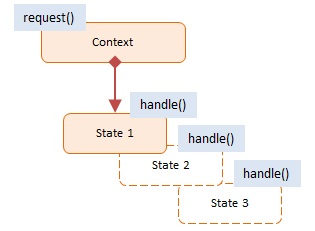
This pattern's objects are as follows:
Context -- example code: TrafficLight
- exposes an interface that supports clients of the service
- keeps a reference to a state object that defines the current state.
- Allows State objects to change their current state to another state.
State -- example code: Red, Yellow, Green
- captures the state's values and associated behavior
Here's an example of a Traffic Light system using the State Design Pattern.
class TrafficLight {
  constructor() {
    this.states = [new GreenLight(), new YellowLight(), new RedLight()];
    this.current = this.states[0];
  }

  change() {
    const totalStates = this.states.length;
    let currentIndex = this.states.findIndex(light => light === this.current);

    if (currentIndex + 1 < totalStates) this.current = this.states[currentIndex + 1];
    else this.current = this.states[0];
  }

  sign() {
    return this.current.sign();
  }
}

class Light {
  constructor(light) {
    this.light = light;
  }
}

class GreenLight extends Light {
  constructor() {
    super('green');
  }

  sign() {
    return 'Go';
  }
}

class YellowLight extends Light {
  constructor() {
    super('yellow');
  }

  sign() {
    return 'Caution';
  }
}

class RedLight extends Light {
  constructor() {
    super('red');
  }

  sign() {
    return 'Stop';
  }
}

// usage
const trafficLight = new TrafficLight();

console.log(trafficLight.sign()); // Green: Go
trafficLight.change();

console.log(trafficLight.sign()); // Yellow: Caution
trafficLight.change();

console.log(trafficLight.sign()); // Red: Stop
trafficLight.change();

// Example output:
// Go
// Caution
// Stop
In this example, the TrafficLight class represents the Context, and it maintains a reference to a state object (current) which serves as the Current State. GreenLight, YellowLight, and RedLight classes represent Concrete States, each with different behaviors encapsulated in the sign() method.
The State pattern belongs to which pattern category?
View Answer:
When should you utilize the State Design Pattern in JavaScript?
View Answer:
What are some of the advantages of employing the State pattern?
View Answer:
- Singular Responsibility Principle -- Separate the code related to each state into separate classes.
- The Open/Closed Principle - Add new states without modifying existing state classes or the context.
- Simplify the contextual code by removing bulky state machine conditionals.
What are some drawbacks of using the State Design Pattern?
View Answer:
Are there any alternatives to using the State pattern?
View Answer:
Why use the State Design Pattern in JavaScript?
View Answer:
What kind of problems does the State Design Pattern solve?
View Answer:
How does the State Design Pattern differ from the Strategy Pattern?
View Answer:
Can you explain the concept of 'Context' and 'State' in the State Design Pattern?
View Answer:
Here's an example with a Water object that changes state between Solid, Liquid, and Gas.
class Water {
  constructor() {
    this.state = new SolidState(this);
  }

  heat() {
    this.state.heat();
  }

  cool() {
    this.state.cool();
  }

  changeState(state) {
    this.state = state;
  }

  printState() {
    this.state.printState();
  }
}

class State {
  constructor(water) {
    this.water = water;
  }

  heat() {
    throw new Error('This method must be overwritten!');
  }

  cool() {
    throw new Error('This method must be overwritten!');
  }

  printState() {
    throw new Error('This method must be overwritten!');
  }
}

class SolidState extends State {
  heat() {
    console.log('Heating ice. Turning to water.');
    this.water.changeState(new LiquidState(this.water));
  }

  cool() {
    console.log('Ice is already cool.');
  }

  printState() {
    console.log('The water is solid.');
  }
}

class LiquidState extends State {
  heat() {
    console.log('Heating water. Turning to gas.');
    this.water.changeState(new GasState(this.water));
  }

  cool() {
    console.log('Cooling water. Turning to ice.');
    this.water.changeState(new SolidState(this.water));
  }

  printState() {
    console.log('The water is liquid.');
  }
}

class GasState extends State {
  heat() {
    console.log('Gas is already hot.');
  }

  cool() {
    console.log('Cooling gas. Turning to water.');
    this.water.changeState(new LiquidState(this.water));
  }

  printState() {
    console.log('The water is gas.');
  }
}

const water = new Water();
water.printState(); // The water is solid.
water.heat(); // Heating ice. Turning to water.
water.printState(); // The water is liquid.
water.heat(); // Heating water. Turning to gas.
water.printState(); // The water is gas.
water.cool(); // Cooling gas. Turning to water.
water.printState(); // The water is liquid.
In this example, Water is the "Context". The "State" is an interface represented by the State class, and SolidState, LiquidState, and GasState are the "Concrete States". The heat() and cool() methods in the Water class delegate to the current state's corresponding methods.